namespace Elementor; use Elementor\Core\Admin\Menu\Admin_Menu_Manager; use Elementor\Core\Wp_Api; use Elementor\Core\Admin\Admin; use Elementor\Core\Breakpoints\Manager as Breakpoints_Manager; use Elementor\Core\Common\App as CommonApp; use Elementor\Core\Debug\Inspector; use Elementor\Core\Documents_Manager; use Elementor\Core\Experiments\Manager as Experiments_Manager; use Elementor\Core\Kits\Manager as Kits_Manager; use Elementor\Core\Editor\Editor; use Elementor\Core\Files\Manager as Files_Manager; use Elementor\Core\Files\Assets\Manager as Assets_Manager; use Elementor\Core\Modules_Manager; use Elementor\Core\Schemes\Manager as Schemes_Manager; use Elementor\Core\Settings\Manager as Settings_Manager; use Elementor\Core\Settings\Page\Manager as Page_Settings_Manager; use Elementor\Core\Upgrade\Elementor_3_Re_Migrate_Globals; use Elementor\Modules\History\Revisions_Manager; use Elementor\Core\DynamicTags\Manager as Dynamic_Tags_Manager; use Elementor\Core\Logger\Manager as Log_Manager; use Elementor\Core\Page_Assets\Loader as Assets_Loader; use Elementor\Modules\System_Info\Module as System_Info_Module; use Elementor\Data\Manager as Data_Manager; use Elementor\Data\V2\Manager as Data_Manager_V2; use Elementor\Core\Common\Modules\DevTools\Module as Dev_Tools; use Elementor\Core\Files\Uploads_Manager as Uploads_Manager; if ( ! defined( 'ABSPATH' ) ) { exit; } /** * Elementor plugin. * * The main plugin handler class is responsible for initializing Elementor. The * class registers and all the components required to run the plugin. * * @since 1.0.0 */ class Plugin { const ELEMENTOR_DEFAULT_POST_TYPES = [ 'page', 'post' ]; /** * Instance. * * Holds the plugin instance. * * @since 1.0.0 * @access public * @static * * @var Plugin */ public static $instance = null; /** * Database. * * Holds the plugin database handler which is responsible for communicating * with the database. * * @since 1.0.0 * @access public * * @var DB */ public $db; /** * Controls manager. * * Holds the plugin controls manager handler is responsible for registering * and initializing controls. * * @since 1.0.0 * @access public * * @var Controls_Manager */ public $controls_manager; /** * Documents manager. * * Holds the documents manager. * * @since 2.0.0 * @access public * * @var Documents_Manager */ public $documents; /** * Schemes manager. * * Holds the plugin schemes manager. * * @since 1.0.0 * @access public * * @var Schemes_Manager */ public $schemes_manager; /** * Elements manager. * * Holds the plugin elements manager. * * @since 1.0.0 * @access public * * @var Elements_Manager */ public $elements_manager; /** * Widgets manager. * * Holds the plugin widgets manager which is responsible for registering and * initializing widgets. * * @since 1.0.0 * @access public * * @var Widgets_Manager */ public $widgets_manager; /** * Revisions manager. * * Holds the plugin revisions manager which handles history and revisions * functionality. * * @since 1.0.0 * @access public * * @var Revisions_Manager */ public $revisions_manager; /** * Images manager. * * Holds the plugin images manager which is responsible for retrieving image * details. * * @since 2.9.0 * @access public * * @var Images_Manager */ public $images_manager; /** * Maintenance mode. * * Holds the maintenance mode manager responsible for the "Maintenance Mode" * and the "Coming Soon" features. * * @since 1.0.0 * @access public * * @var Maintenance_Mode */ public $maintenance_mode; /** * Page settings manager. * * Holds the page settings manager. * * @since 1.0.0 * @access public * * @var Page_Settings_Manager */ public $page_settings_manager; /** * Dynamic tags manager. * * Holds the dynamic tags manager. * * @since 1.0.0 * @access public * * @var Dynamic_Tags_Manager */ public $dynamic_tags; /** * Settings. * * Holds the plugin settings. * * @since 1.0.0 * @access public * * @var Settings */ public $settings; /** * Role Manager. * * Holds the plugin role manager. * * @since 2.0.0 * @access public * * @var Core\RoleManager\Role_Manager */ public $role_manager; /** * Admin. * * Holds the plugin admin. * * @since 1.0.0 * @access public * * @var Admin */ public $admin; /** * Tools. * * Holds the plugin tools. * * @since 1.0.0 * @access public * * @var Tools */ public $tools; /** * Preview. * * Holds the plugin preview. * * @since 1.0.0 * @access public * * @var Preview */ public $preview; /** * Editor. * * Holds the plugin editor. * * @since 1.0.0 * @access public * * @var Editor */ public $editor; /** * Frontend. * * Holds the plugin frontend. * * @since 1.0.0 * @access public * * @var Frontend */ public $frontend; /** * Heartbeat. * * Holds the plugin heartbeat. * * @since 1.0.0 * @access public * * @var Heartbeat */ public $heartbeat; /** * System info. * * Holds the system info data. * * @since 1.0.0 * @access public * * @var System_Info_Module */ public $system_info; /** * Template library manager. * * Holds the template library manager. * * @since 1.0.0 * @access public * * @var TemplateLibrary\Manager */ public $templates_manager; /** * Skins manager. * * Holds the skins manager. * * @since 1.0.0 * @access public * * @var Skins_Manager */ public $skins_manager; /** * Files manager. * * Holds the plugin files manager. * * @since 2.1.0 * @access public * * @var Files_Manager */ public $files_manager; /** * Assets manager. * * Holds the plugin assets manager. * * @since 2.6.0 * @access public * * @var Assets_Manager */ public $assets_manager; /** * Icons Manager. * * Holds the plugin icons manager. * * @access public * * @var Icons_Manager */ public $icons_manager; /** * WordPress widgets manager. * * Holds the WordPress widgets manager. * * @since 1.0.0 * @access public * * @var WordPress_Widgets_Manager */ public $wordpress_widgets_manager; /** * Modules manager. * * Holds the plugin modules manager. * * @since 1.0.0 * @access public * * @var Modules_Manager */ public $modules_manager; /** * Beta testers. * * Holds the plugin beta testers. * * @since 1.0.0 * @access public * * @var Beta_Testers */ public $beta_testers; /** * Inspector. * * Holds the plugin inspector data. * * @since 2.1.2 * @access public * * @var Inspector */ public $inspector; /** * @var Admin_Menu_Manager */ public $admin_menu_manager; /** * Common functionality. * * Holds the plugin common functionality. * * @since 2.3.0 * @access public * * @var CommonApp */ public $common; /** * Log manager. * * Holds the plugin log manager. * * @access public * * @var Log_Manager */ public $logger; /** * Dev tools. * * Holds the plugin dev tools. * * @access private * * @var Dev_Tools */ private $dev_tools; /** * Upgrade manager. * * Holds the plugin upgrade manager. * * @access public * * @var Core\Upgrade\Manager */ public $upgrade; /** * Tasks manager. * * Holds the plugin tasks manager. * * @var Core\Upgrade\Custom_Tasks_Manager */ public $custom_tasks; /** * Kits manager. * * Holds the plugin kits manager. * * @access public * * @var Core\Kits\Manager */ public $kits_manager; /** * @var \Elementor\Data\V2\Manager */ public $data_manager_v2; /** * Legacy mode. * * Holds the plugin legacy mode data. * * @access public * * @var array */ public $legacy_mode; /** * App. * * Holds the plugin app data. * * @since 3.0.0 * @access public * * @var App\App */ public $app; /** * WordPress API. * * Holds the methods that interact with WordPress Core API. * * @since 3.0.0 * @access public * * @var Wp_Api */ public $wp; /** * Experiments manager. * * Holds the plugin experiments manager. * * @since 3.1.0 * @access public * * @var Experiments_Manager */ public $experiments; /** * Uploads manager. * * Holds the plugin uploads manager responsible for handling file uploads * that are not done with WordPress Media. * * @since 3.3.0 * @access public * * @var Uploads_Manager */ public $uploads_manager; /** * Breakpoints manager. * * Holds the plugin breakpoints manager. * * @since 3.2.0 * @access public * * @var Breakpoints_Manager */ public $breakpoints; /** * Assets loader. * * Holds the plugin assets loader responsible for conditionally enqueuing * styles and script assets that were pre-enabled. * * @since 3.3.0 * @access public * * @var Assets_Loader */ public $assets_loader; /** * Clone. * * Disable class cloning and throw an error on object clone. * * The whole idea of the singleton design pattern is that there is a single * object. Therefore, we don't want the object to be cloned. * * @access public * @since 1.0.0 */ public function __clone() { _doing_it_wrong( __FUNCTION__, sprintf( 'Cloning instances of the singleton "%s" class is forbidden.', get_class( $this ) ), // phpcs:ignore WordPress.Security.EscapeOutput.OutputNotEscaped '1.0.0' ); } /** * Wakeup. * * Disable unserializing of the class. * * @access public * @since 1.0.0 */ public function __wakeup() { _doing_it_wrong( __FUNCTION__, sprintf( 'Unserializing instances of the singleton "%s" class is forbidden.', get_class( $this ) ), // phpcs:ignore WordPress.Security.EscapeOutput.OutputNotEscaped '1.0.0' ); } /** * Instance. * * Ensures only one instance of the plugin class is loaded or can be loaded. * * @since 1.0.0 * @access public * @static * * @return Plugin An instance of the class. */ public static function instance() { if ( is_null( self::$instance ) ) { self::$instance = new self(); /** * Elementor loaded. * * Fires when Elementor was fully loaded and instantiated. * * @since 1.0.0 */ do_action( 'elementor/loaded' ); } return self::$instance; } /** * Init. * * Initialize Elementor Plugin. Register Elementor support for all the * supported post types and initialize Elementor components. * * @since 1.0.0 * @access public */ public function init() { $this->add_cpt_support(); $this->init_components(); /** * Elementor init. * * Fires when Elementor components are initialized. * * After Elementor finished loading but before any headers are sent. * * @since 1.0.0 */ do_action( 'elementor/init' ); } /** * Get install time. * * Retrieve the time when Elementor was installed. * * @since 2.6.0 * @access public * @static * * @return int Unix timestamp when Elementor was installed. */ public function get_install_time() { $installed_time = get_option( '_elementor_installed_time' ); if ( ! $installed_time ) { $installed_time = time(); update_option( '_elementor_installed_time', $installed_time ); } return $installed_time; } /** * @since 2.3.0 * @access public */ public function on_rest_api_init() { // On admin/frontend sometimes the rest API is initialized after the common is initialized. if ( ! $this->common ) { $this->init_common(); } } /** * Init components. * * Initialize Elementor components. Register actions, run setting manager, * initialize all the components that run elementor, and if in admin page * initialize admin components. * * @since 1.0.0 * @access private */ private function init_components() { $this->experiments = new Experiments_Manager(); $this->breakpoints = new Breakpoints_Manager(); $this->inspector = new Inspector(); Settings_Manager::run(); $this->db = new DB(); $this->controls_manager = new Controls_Manager(); $this->documents = new Documents_Manager(); $this->kits_manager = new Kits_Manager(); $this->schemes_manager = new Schemes_Manager(); $this->elements_manager = new Elements_Manager(); $this->widgets_manager = new Widgets_Manager(); $this->skins_manager = new Skins_Manager(); $this->files_manager = new Files_Manager(); $this->assets_manager = new Assets_Manager(); $this->icons_manager = new Icons_Manager(); $this->settings = new Settings(); $this->tools = new Tools(); $this->editor = new Editor(); $this->preview = new Preview(); $this->frontend = new Frontend(); $this->maintenance_mode = new Maintenance_Mode(); $this->dynamic_tags = new Dynamic_Tags_Manager(); $this->modules_manager = new Modules_Manager(); $this->templates_manager = new TemplateLibrary\Manager(); $this->role_manager = new Core\RoleManager\Role_Manager(); $this->system_info = new System_Info_Module(); $this->revisions_manager = new Revisions_Manager(); $this->images_manager = new Images_Manager(); $this->wp = new Wp_Api(); $this->assets_loader = new Assets_Loader(); $this->uploads_manager = new Uploads_Manager(); $this->admin_menu_manager = new Admin_Menu_Manager(); $this->admin_menu_manager->register_actions(); User::init(); Api::init(); Tracker::init(); $this->upgrade = new Core\Upgrade\Manager(); $this->custom_tasks = new Core\Upgrade\Custom_Tasks_Manager(); $this->app = new App\App(); if ( is_admin() ) { $this->heartbeat = new Heartbeat(); $this->wordpress_widgets_manager = new WordPress_Widgets_Manager(); $this->admin = new Admin(); $this->beta_testers = new Beta_Testers(); new Elementor_3_Re_Migrate_Globals(); } } /** * @since 2.3.0 * @access public */ public function init_common() { $this->common = new CommonApp(); $this->common->init_components(); } /** * Get Legacy Mode * * @since 3.0.0 * @deprecated 3.1.0 Use `Plugin::$instance->experiments->is_feature_active()` instead * * @param string $mode_name Optional. Default is null * * @return bool|bool[] */ public function get_legacy_mode( $mode_name = null ) { self::$instance->modules_manager->get_modules( 'dev-tools' )->deprecation ->deprecated_function( __METHOD__, '3.1.0', 'Plugin::$instance->experiments->is_feature_active()' ); $legacy_mode = [ 'elementWrappers' => ! self::$instance->experiments->is_feature_active( 'e_dom_optimization' ), ]; if ( ! $mode_name ) { return $legacy_mode; } if ( isset( $legacy_mode[ $mode_name ] ) ) { return $legacy_mode[ $mode_name ]; } // If there is no legacy mode with the given mode name; return false; } /** * Add custom post type support. * * Register Elementor support for all the supported post types defined by * the user in the admin screen and saved as `elementor_cpt_support` option * in WordPress `$wpdb->options` table. * * If no custom post type selected, usually in new installs, this method * will return the two default post types: `page` and `post`. * * @since 1.0.0 * @access private */ private function add_cpt_support() { $cpt_support = get_option( 'elementor_cpt_support', self::ELEMENTOR_DEFAULT_POST_TYPES ); foreach ( $cpt_support as $cpt_slug ) { add_post_type_support( $cpt_slug, 'elementor' ); } } /** * Register autoloader. * * Elementor autoloader loads all the classes needed to run the plugin. * * @since 1.6.0 * @access private */ private function register_autoloader() { require_once ELEMENTOR_PATH . '/includes/autoloader.php'; Autoloader::run(); } /** * Plugin Magic Getter * * @since 3.1.0 * @access public * * @param $property * @return mixed * @throws \Exception */ public function __get( $property ) { if ( 'posts_css_manager' === $property ) { self::$instance->modules_manager->get_modules( 'dev-tools' )->deprecation->deprecated_argument( 'Plugin::$instance->posts_css_manager', '2.7.0', 'Plugin::$instance->files_manager' ); return $this->files_manager; } if ( 'data_manager' === $property ) { return Data_Manager::instance(); } if ( property_exists( $this, $property ) ) { throw new \Exception( 'Cannot access private property.' ); } return null; } /** * Plugin constructor. * * Initializing Elementor plugin. * * @since 1.0.0 * @access private */ private function __construct() { $this->register_autoloader(); $this->logger = Log_Manager::instance(); $this->data_manager_v2 = Data_Manager_V2::instance(); Maintenance::init(); Compatibility::register_actions(); add_action( 'init', [ $this, 'init' ], 0 ); add_action( 'rest_api_init', [ $this, 'on_rest_api_init' ], 9 ); } final public static function get_title() { return esc_html__( 'Elementor', 'elementor' ); } } if ( ! defined( 'ELEMENTOR_TESTS' ) ) { // In tests we run the instance manually. Plugin::instance(); } Klik Her Og Spil Chicken Road 2 Online I Dag – Vitreo Retina Society

HomeKlik Her Og Spil Chicken Road 2 Online I DagChicken Road 2Klik Her Og Spil Chicken Road 2 Online I Dag

Klik Her Og Spil Chicken Road 2 Online I Dag

Når du søger efter en spændende online-spiloplevelse, kan Chicken Road 2 være et attraktivt valg. Dog er der flere aspekter at overveje før du begynder at spille. I denne artikel vil vi undersøge nogle af de problematikker, der kan opstå, når du spiller Chicken Road 2 online.

Problem nr. 1: Sikkerhed og Efterbehandling i Chicken Road 2 Casino

For at forstå, hvordan du kan bruge Chicken Road 2 til fuld nytte, er det vigtigt at vide, hvordan sikkerheden og efterbehandlingen fungerer. Chicken Road 2 Casino tilbyder en omfattende løsning, hvor du kan være sikker på, at din konto og adgang til spillet er godt beskyttet. Her er en oversigt over, hvad der sker med din konto efter en afslutning:

Spørgsmål Svar
Hvad sker der med mit konto efter en afslutning i Chicken Road 2? Din konto vil stadig være aktiv, og du kan fortsætte med at spille, når du vil.
Er der nogen sikkerhedsmåder til at sikre min konto og adgang til spillet? Ja, [Chicken Road 2 Casino](https://chickenroad2game.dk) tilbyder en sikker og stabil platform, hvor du kan være sikker på, at din konto er beskyttet.
Hvordan opdaterer jeg min profil og tilgange til spillet i Chicken Road 2 Casino? Du kan opdatere din profil og tilgange til spillet i din konto, hvor du kan finde alle de nødvendige oplysninger og instruktioner.

Problem nr. 2: Problemer med at Spille Chicken Road 2 Online

Når du søger efter at spille Chicken Road 2 online, kan du møde nogle problemer med at downloade eller åbne spillet på din enhed. Her er nogle af de tekniske krav, du skal være opmærksom på:
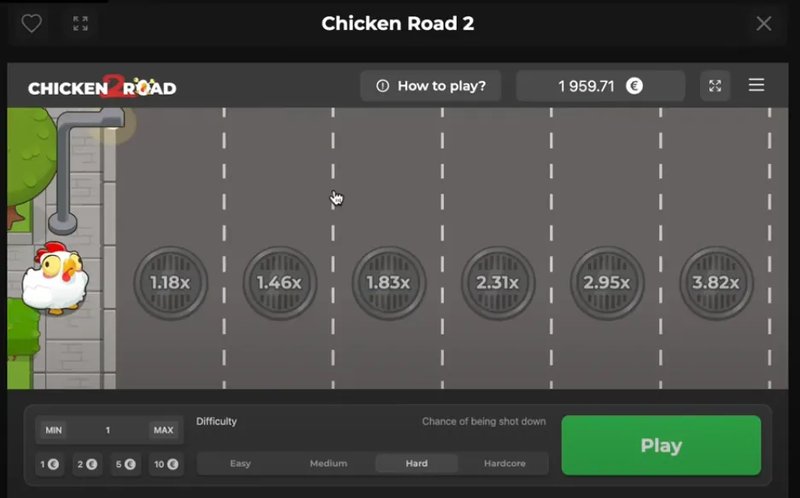
Klik Her Og Spil Chicken Road 2 Online I Dag in Denmark
Spørgsmål Svar
Problemer med at downloade eller åbne spillet på min enhed (mobil eller computer)? Ja, der kan være problemer med at downloade eller åbne spillet på din enhed, hvis den ikke opfyrer til de krav, der er nødvendige for at spille.
Er der nogen tekniske krav for at kunne spille Chicken Road 2 på min enhed? Ja, du skal have en enhed med et minimum af 2 GB RAM og en proceshor til 2,4 GHz for at spille Chicken Road 2 uden problemer.
Hvilke forbedringer af spillet kan jeg håbe på i fremtiden? Vi håber på at se flere forbedringer af spillet, såsom bedre grafik og en mere intuitiv brugerflade.

Problem nr. 3: Finansiel og Juridisk Sikkerhed ved Chicken Road 2 Casino

Som en online-spillere har du også ret til at være sikker på, at din personlige information er beskyttet og at du kan være sikker på, at din indsats og gevinst er sikret. Her er nogle af de finansielle og juridiske aspekter, du skal være opmærksom på:

Spørgsmål Svar
Er min personlige information sikret i Chicken Road 2 Casino? Ja, [Chicken Road 2 Casino](https://chickenroad2game.dk) tilbyder en sikker og stabil platform, hvor du kan være sikker på, at din personlige information er beskyttet.
Hvor sikker er det at overføre penge til og fra min konto i spillet? Ja, det er meget sikker at overføre penge til og fra din konto i spillet. [Chicken Road 2 Casino](https://chickenroad2game.dk) tilbyder en sikker og stabil platform, hvor du kan være sikker på, at dine penge er sikre.
Er der nogen begrænsninger i spillet vedrørende min maksimale indsats eller gevinst? Ja, der er nogen begrænsninger i spillet, når det kommer til din maksimale indsats og gevinst. Du kan finde mere information om dette i spillets regler og viller.

I slutningen af denne artikel håber vi, at du har fået en bedre forståelse af de problematikker, der kan opstå, når du spiller Chicken Road 2 online. Vi håber, at du vil have en god spiloplevelse med Chicken Road 2 Casino.