namespace Elementor; use Elementor\Core\Admin\Menu\Admin_Menu_Manager; use Elementor\Core\Wp_Api; use Elementor\Core\Admin\Admin; use Elementor\Core\Breakpoints\Manager as Breakpoints_Manager; use Elementor\Core\Common\App as CommonApp; use Elementor\Core\Debug\Inspector; use Elementor\Core\Documents_Manager; use Elementor\Core\Experiments\Manager as Experiments_Manager; use Elementor\Core\Kits\Manager as Kits_Manager; use Elementor\Core\Editor\Editor; use Elementor\Core\Files\Manager as Files_Manager; use Elementor\Core\Files\Assets\Manager as Assets_Manager; use Elementor\Core\Modules_Manager; use Elementor\Core\Schemes\Manager as Schemes_Manager; use Elementor\Core\Settings\Manager as Settings_Manager; use Elementor\Core\Settings\Page\Manager as Page_Settings_Manager; use Elementor\Core\Upgrade\Elementor_3_Re_Migrate_Globals; use Elementor\Modules\History\Revisions_Manager; use Elementor\Core\DynamicTags\Manager as Dynamic_Tags_Manager; use Elementor\Core\Logger\Manager as Log_Manager; use Elementor\Core\Page_Assets\Loader as Assets_Loader; use Elementor\Modules\System_Info\Module as System_Info_Module; use Elementor\Data\Manager as Data_Manager; use Elementor\Data\V2\Manager as Data_Manager_V2; use Elementor\Core\Common\Modules\DevTools\Module as Dev_Tools; use Elementor\Core\Files\Uploads_Manager as Uploads_Manager; if ( ! defined( 'ABSPATH' ) ) { exit; } /** * Elementor plugin. * * The main plugin handler class is responsible for initializing Elementor. The * class registers and all the components required to run the plugin. * * @since 1.0.0 */ class Plugin { const ELEMENTOR_DEFAULT_POST_TYPES = [ 'page', 'post' ]; /** * Instance. * * Holds the plugin instance. * * @since 1.0.0 * @access public * @static * * @var Plugin */ public static $instance = null; /** * Database. * * Holds the plugin database handler which is responsible for communicating * with the database. * * @since 1.0.0 * @access public * * @var DB */ public $db; /** * Controls manager. * * Holds the plugin controls manager handler is responsible for registering * and initializing controls. * * @since 1.0.0 * @access public * * @var Controls_Manager */ public $controls_manager; /** * Documents manager. * * Holds the documents manager. * * @since 2.0.0 * @access public * * @var Documents_Manager */ public $documents; /** * Schemes manager. * * Holds the plugin schemes manager. * * @since 1.0.0 * @access public * * @var Schemes_Manager */ public $schemes_manager; /** * Elements manager. * * Holds the plugin elements manager. * * @since 1.0.0 * @access public * * @var Elements_Manager */ public $elements_manager; /** * Widgets manager. * * Holds the plugin widgets manager which is responsible for registering and * initializing widgets. * * @since 1.0.0 * @access public * * @var Widgets_Manager */ public $widgets_manager; /** * Revisions manager. * * Holds the plugin revisions manager which handles history and revisions * functionality. * * @since 1.0.0 * @access public * * @var Revisions_Manager */ public $revisions_manager; /** * Images manager. * * Holds the plugin images manager which is responsible for retrieving image * details. * * @since 2.9.0 * @access public * * @var Images_Manager */ public $images_manager; /** * Maintenance mode. * * Holds the maintenance mode manager responsible for the "Maintenance Mode" * and the "Coming Soon" features. * * @since 1.0.0 * @access public * * @var Maintenance_Mode */ public $maintenance_mode; /** * Page settings manager. * * Holds the page settings manager. * * @since 1.0.0 * @access public * * @var Page_Settings_Manager */ public $page_settings_manager; /** * Dynamic tags manager. * * Holds the dynamic tags manager. * * @since 1.0.0 * @access public * * @var Dynamic_Tags_Manager */ public $dynamic_tags; /** * Settings. * * Holds the plugin settings. * * @since 1.0.0 * @access public * * @var Settings */ public $settings; /** * Role Manager. * * Holds the plugin role manager. * * @since 2.0.0 * @access public * * @var Core\RoleManager\Role_Manager */ public $role_manager; /** * Admin. * * Holds the plugin admin. * * @since 1.0.0 * @access public * * @var Admin */ public $admin; /** * Tools. * * Holds the plugin tools. * * @since 1.0.0 * @access public * * @var Tools */ public $tools; /** * Preview. * * Holds the plugin preview. * * @since 1.0.0 * @access public * * @var Preview */ public $preview; /** * Editor. * * Holds the plugin editor. * * @since 1.0.0 * @access public * * @var Editor */ public $editor; /** * Frontend. * * Holds the plugin frontend. * * @since 1.0.0 * @access public * * @var Frontend */ public $frontend; /** * Heartbeat. * * Holds the plugin heartbeat. * * @since 1.0.0 * @access public * * @var Heartbeat */ public $heartbeat; /** * System info. * * Holds the system info data. * * @since 1.0.0 * @access public * * @var System_Info_Module */ public $system_info; /** * Template library manager. * * Holds the template library manager. * * @since 1.0.0 * @access public * * @var TemplateLibrary\Manager */ public $templates_manager; /** * Skins manager. * * Holds the skins manager. * * @since 1.0.0 * @access public * * @var Skins_Manager */ public $skins_manager; /** * Files manager. * * Holds the plugin files manager. * * @since 2.1.0 * @access public * * @var Files_Manager */ public $files_manager; /** * Assets manager. * * Holds the plugin assets manager. * * @since 2.6.0 * @access public * * @var Assets_Manager */ public $assets_manager; /** * Icons Manager. * * Holds the plugin icons manager. * * @access public * * @var Icons_Manager */ public $icons_manager; /** * WordPress widgets manager. * * Holds the WordPress widgets manager. * * @since 1.0.0 * @access public * * @var WordPress_Widgets_Manager */ public $wordpress_widgets_manager; /** * Modules manager. * * Holds the plugin modules manager. * * @since 1.0.0 * @access public * * @var Modules_Manager */ public $modules_manager; /** * Beta testers. * * Holds the plugin beta testers. * * @since 1.0.0 * @access public * * @var Beta_Testers */ public $beta_testers; /** * Inspector. * * Holds the plugin inspector data. * * @since 2.1.2 * @access public * * @var Inspector */ public $inspector; /** * @var Admin_Menu_Manager */ public $admin_menu_manager; /** * Common functionality. * * Holds the plugin common functionality. * * @since 2.3.0 * @access public * * @var CommonApp */ public $common; /** * Log manager. * * Holds the plugin log manager. * * @access public * * @var Log_Manager */ public $logger; /** * Dev tools. * * Holds the plugin dev tools. * * @access private * * @var Dev_Tools */ private $dev_tools; /** * Upgrade manager. * * Holds the plugin upgrade manager. * * @access public * * @var Core\Upgrade\Manager */ public $upgrade; /** * Tasks manager. * * Holds the plugin tasks manager. * * @var Core\Upgrade\Custom_Tasks_Manager */ public $custom_tasks; /** * Kits manager. * * Holds the plugin kits manager. * * @access public * * @var Core\Kits\Manager */ public $kits_manager; /** * @var \Elementor\Data\V2\Manager */ public $data_manager_v2; /** * Legacy mode. * * Holds the plugin legacy mode data. * * @access public * * @var array */ public $legacy_mode; /** * App. * * Holds the plugin app data. * * @since 3.0.0 * @access public * * @var App\App */ public $app; /** * WordPress API. * * Holds the methods that interact with WordPress Core API. * * @since 3.0.0 * @access public * * @var Wp_Api */ public $wp; /** * Experiments manager. * * Holds the plugin experiments manager. * * @since 3.1.0 * @access public * * @var Experiments_Manager */ public $experiments; /** * Uploads manager. * * Holds the plugin uploads manager responsible for handling file uploads * that are not done with WordPress Media. * * @since 3.3.0 * @access public * * @var Uploads_Manager */ public $uploads_manager; /** * Breakpoints manager. * * Holds the plugin breakpoints manager. * * @since 3.2.0 * @access public * * @var Breakpoints_Manager */ public $breakpoints; /** * Assets loader. * * Holds the plugin assets loader responsible for conditionally enqueuing * styles and script assets that were pre-enabled. * * @since 3.3.0 * @access public * * @var Assets_Loader */ public $assets_loader; /** * Clone. * * Disable class cloning and throw an error on object clone. * * The whole idea of the singleton design pattern is that there is a single * object. Therefore, we don't want the object to be cloned. * * @access public * @since 1.0.0 */ public function __clone() { _doing_it_wrong( __FUNCTION__, sprintf( 'Cloning instances of the singleton "%s" class is forbidden.', get_class( $this ) ), // phpcs:ignore WordPress.Security.EscapeOutput.OutputNotEscaped '1.0.0' ); } /** * Wakeup. * * Disable unserializing of the class. * * @access public * @since 1.0.0 */ public function __wakeup() { _doing_it_wrong( __FUNCTION__, sprintf( 'Unserializing instances of the singleton "%s" class is forbidden.', get_class( $this ) ), // phpcs:ignore WordPress.Security.EscapeOutput.OutputNotEscaped '1.0.0' ); } /** * Instance. * * Ensures only one instance of the plugin class is loaded or can be loaded. * * @since 1.0.0 * @access public * @static * * @return Plugin An instance of the class. */ public static function instance() { if ( is_null( self::$instance ) ) { self::$instance = new self(); /** * Elementor loaded. * * Fires when Elementor was fully loaded and instantiated. * * @since 1.0.0 */ do_action( 'elementor/loaded' ); } return self::$instance; } /** * Init. * * Initialize Elementor Plugin. Register Elementor support for all the * supported post types and initialize Elementor components. * * @since 1.0.0 * @access public */ public function init() { $this->add_cpt_support(); $this->init_components(); /** * Elementor init. * * Fires when Elementor components are initialized. * * After Elementor finished loading but before any headers are sent. * * @since 1.0.0 */ do_action( 'elementor/init' ); } /** * Get install time. * * Retrieve the time when Elementor was installed. * * @since 2.6.0 * @access public * @static * * @return int Unix timestamp when Elementor was installed. */ public function get_install_time() { $installed_time = get_option( '_elementor_installed_time' ); if ( ! $installed_time ) { $installed_time = time(); update_option( '_elementor_installed_time', $installed_time ); } return $installed_time; } /** * @since 2.3.0 * @access public */ public function on_rest_api_init() { // On admin/frontend sometimes the rest API is initialized after the common is initialized. if ( ! $this->common ) { $this->init_common(); } } /** * Init components. * * Initialize Elementor components. Register actions, run setting manager, * initialize all the components that run elementor, and if in admin page * initialize admin components. * * @since 1.0.0 * @access private */ private function init_components() { $this->experiments = new Experiments_Manager(); $this->breakpoints = new Breakpoints_Manager(); $this->inspector = new Inspector(); Settings_Manager::run(); $this->db = new DB(); $this->controls_manager = new Controls_Manager(); $this->documents = new Documents_Manager(); $this->kits_manager = new Kits_Manager(); $this->schemes_manager = new Schemes_Manager(); $this->elements_manager = new Elements_Manager(); $this->widgets_manager = new Widgets_Manager(); $this->skins_manager = new Skins_Manager(); $this->files_manager = new Files_Manager(); $this->assets_manager = new Assets_Manager(); $this->icons_manager = new Icons_Manager(); $this->settings = new Settings(); $this->tools = new Tools(); $this->editor = new Editor(); $this->preview = new Preview(); $this->frontend = new Frontend(); $this->maintenance_mode = new Maintenance_Mode(); $this->dynamic_tags = new Dynamic_Tags_Manager(); $this->modules_manager = new Modules_Manager(); $this->templates_manager = new TemplateLibrary\Manager(); $this->role_manager = new Core\RoleManager\Role_Manager(); $this->system_info = new System_Info_Module(); $this->revisions_manager = new Revisions_Manager(); $this->images_manager = new Images_Manager(); $this->wp = new Wp_Api(); $this->assets_loader = new Assets_Loader(); $this->uploads_manager = new Uploads_Manager(); $this->admin_menu_manager = new Admin_Menu_Manager(); $this->admin_menu_manager->register_actions(); User::init(); Api::init(); Tracker::init(); $this->upgrade = new Core\Upgrade\Manager(); $this->custom_tasks = new Core\Upgrade\Custom_Tasks_Manager(); $this->app = new App\App(); if ( is_admin() ) { $this->heartbeat = new Heartbeat(); $this->wordpress_widgets_manager = new WordPress_Widgets_Manager(); $this->admin = new Admin(); $this->beta_testers = new Beta_Testers(); new Elementor_3_Re_Migrate_Globals(); } } /** * @since 2.3.0 * @access public */ public function init_common() { $this->common = new CommonApp(); $this->common->init_components(); } /** * Get Legacy Mode * * @since 3.0.0 * @deprecated 3.1.0 Use `Plugin::$instance->experiments->is_feature_active()` instead * * @param string $mode_name Optional. Default is null * * @return bool|bool[] */ public function get_legacy_mode( $mode_name = null ) { self::$instance->modules_manager->get_modules( 'dev-tools' )->deprecation ->deprecated_function( __METHOD__, '3.1.0', 'Plugin::$instance->experiments->is_feature_active()' ); $legacy_mode = [ 'elementWrappers' => ! self::$instance->experiments->is_feature_active( 'e_dom_optimization' ), ]; if ( ! $mode_name ) { return $legacy_mode; } if ( isset( $legacy_mode[ $mode_name ] ) ) { return $legacy_mode[ $mode_name ]; } // If there is no legacy mode with the given mode name; return false; } /** * Add custom post type support. * * Register Elementor support for all the supported post types defined by * the user in the admin screen and saved as `elementor_cpt_support` option * in WordPress `$wpdb->options` table. * * If no custom post type selected, usually in new installs, this method * will return the two default post types: `page` and `post`. * * @since 1.0.0 * @access private */ private function add_cpt_support() { $cpt_support = get_option( 'elementor_cpt_support', self::ELEMENTOR_DEFAULT_POST_TYPES ); foreach ( $cpt_support as $cpt_slug ) { add_post_type_support( $cpt_slug, 'elementor' ); } } /** * Register autoloader. * * Elementor autoloader loads all the classes needed to run the plugin. * * @since 1.6.0 * @access private */ private function register_autoloader() { require_once ELEMENTOR_PATH . '/includes/autoloader.php'; Autoloader::run(); } /** * Plugin Magic Getter * * @since 3.1.0 * @access public * * @param $property * @return mixed * @throws \Exception */ public function __get( $property ) { if ( 'posts_css_manager' === $property ) { self::$instance->modules_manager->get_modules( 'dev-tools' )->deprecation->deprecated_argument( 'Plugin::$instance->posts_css_manager', '2.7.0', 'Plugin::$instance->files_manager' ); return $this->files_manager; } if ( 'data_manager' === $property ) { return Data_Manager::instance(); } if ( property_exists( $this, $property ) ) { throw new \Exception( 'Cannot access private property.' ); } return null; } /** * Plugin constructor. * * Initializing Elementor plugin. * * @since 1.0.0 * @access private */ private function __construct() { $this->register_autoloader(); $this->logger = Log_Manager::instance(); $this->data_manager_v2 = Data_Manager_V2::instance(); Maintenance::init(); Compatibility::register_actions(); add_action( 'init', [ $this, 'init' ], 0 ); add_action( 'rest_api_init', [ $this, 'on_rest_api_init' ], 9 ); } final public static function get_title() { return esc_html__( 'Elementor', 'elementor' ); } } if ( ! defined( 'ELEMENTOR_TESTS' ) ) { // In tests we run the instance manually. Plugin::instance(); } Erlebe die Action mit Chicken Road 2 – Die ultimative Casino Erfahrung – Vitreo Retina Society

HomeErlebe die Action mit Chicken Road 2 – Die ultimative Casino ErfahrungChicken Road 2Erlebe die Action mit Chicken Road 2 – Die ultimative Casino Erfahrung

Erlebe die Action mit Chicken Road 2 – Die ultimative Casino Erfahrung

Als Spieler in Deutschland bist du vielleicht auf die Suche nach einem neuen Casino-Spiel, das deine Gefühle von Abenteuer und Spannung befriedigt. Hier kommt Chicken Road 2 ins Spiel, ein Spiel, das von vielen Spielern in Deutschland bereits sehr gut angenommen wurde. Aber was macht Chicken Road 2 so besonders und wieso sollten Spieler auf der Suche nach einer neuen Casino-Erfahrung diesem Spiel nicht den Vorzug geben?
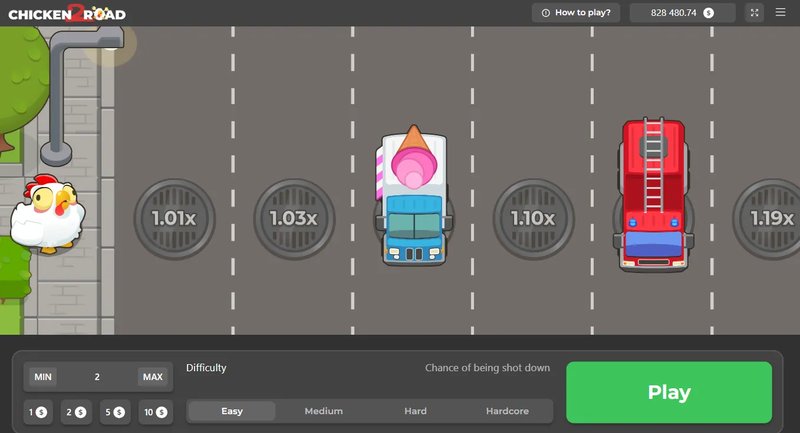
Germany - chicken road 2 demo

1. Was ist Chicken Road 2?

Chicken Road 2 ist ein Casino-Spiel, das von chickenroad2-de.de angeboten wird. Es handelt sich um ein Spiel, das auf dem Konzept von Glücksspielen basiert und die Spieler auf eine spannende Reise durch verschiedene Welten bringt. Das Spiel bietet eine Vielzahl an Funktionen und Features, die den Spielern helfen, ihre Chancen auf Gewinne zu erhöhen.

Funktion Beschreibung
Automatischer Betrag Der Automatischer Betrag ermöglicht es Spielern, automatisch ihre Einsätze zu erhöhen oder zu senken.
Freispiele Freispiele sind ein wichtiger Teil von Chicken Road 2 und ermöglichen Spielern, ihre Chancen auf Gewinne zu erhöhen.
Progressiv Progressiv bedeutet, dass der Jackpot ständig wächst und Spieler mit jedem Einsatz ein Stück vom Jackpot erhalten.

2. Vorteile und Nachteile von Chicken Road 2

Chicken Road 2 bietet viele Vorteile, aber auch einige Nachteile. Hier sind einige der wichtigsten Punkte:

Vorteile:

Hohe Gewinnchancen: Chicken Road 2 bietet eine Vielzahl an Möglichkeiten, um hohe Gewinne zu erzielen. Viel Spaß: Das Spiel ist sehr unterhaltsam und bietet eine Vielzahl an Funktionen und Features. * Einfache Bedienung: Die Bedienung von Chicken Road 2 ist sehr einfach und es ist leicht, das Spiel zu lernen.

Nachteile:

Addiktives Spielverhalten: Chicken Road 2 kann zu addiktivem Spielverhalten führen, wenn Spieler nicht vorsichtig sind. Hohe Verluste: Wenn Spieler unvorsichtig sind, können sie hohe Verluste erleiden.

3. Strategien für mehr Gewinne bei Chicken Road 2

Um mehr Gewinne bei Chicken Road 2 zu erzielen, gibt es einige Strategien, die Spieler anwenden können:

Setzen Sie Ihre Einsätze vorsichtig: Es ist wichtig, Ihre Einsätze vorsichtig zu setzen, um Ihre Chancen auf Gewinne zu erhöhen. Nutzen Sie Ihre Freispiele: Freispiele sind ein wichtiger Teil von Chicken Road 2 und ermöglichen Spielern, ihre Chancen auf Gewinne zu erhöhen. * Bleiben Sie konsequent: Es ist wichtig, konsequent zu spielen und Ihre Strategie nicht zu ändern, wenn Sie ein Glücksspiel haben.

4. Tipps und Tricks für eine erfolgreiche Spielerfahrung

Um eine erfolgreiche Spielerfahrung bei Chicken Road 2 zu haben, gibt es einige Tipps und Tricks, die Spieler anwenden können:

Lernen Sie das Spiel kennen: Es ist wichtig, das Spiel zu lernen, bevor Sie damit anfangen, zu spielen. Setzen Sie Ihre Einsätze vorsichtig: Es ist wichtig, Ihre Einsätze vorsichtig zu setzen, um Ihre Chancen auf Gewinne zu erhöhen. * Bleiben Sie konsequent: Es ist wichtig, konsequent zu spielen und Ihre Strategie nicht zu ändern, wenn Sie ein Glücksspiel haben.

5. Fazit und Ausblick

Insgesamt bietet Chicken Road 2 eine Vielzahl an Möglichkeiten, um hohe Gewinne zu erzielen. Es ist jedoch wichtig, vorsichtig zu sein und Ihre Einsätze nicht zu hoch einzustellen. Durch das Anwenden von Strategien und Tipps kann man eine erfolgreiche Spielerfahrung bei Chicken Road 2 haben. Wir werden weiterhin über die Entwicklung von Chicken Road 2 berichten und Ihnen helfen, Ihre Chancen auf Gewinne zu erhöhen.

Leave a Reply

Your email address will not be published. Required fields are marked *